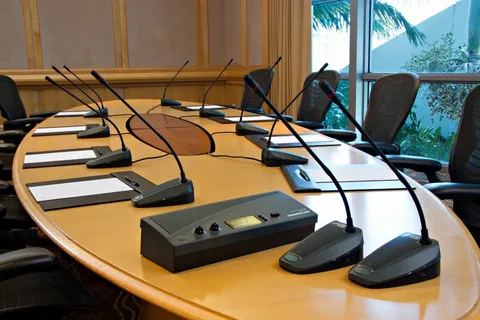
Choosing the right video conferencing equipment is more than ticking a product list—it’s about assembling a dependable system that solves communication problems for real people. Too many organizations buy individual devices and expect a great meeting experience by magic; the truth is that meeting quality depends on matching the right video conferencing equipment to room use-cases, network readiness, acoustics, operational processes and lifecycle support. This article walks you through the practical decisions that turn hardware into predictable collaboration: how to map use-cases to equipment, why audio first matters, how to size cameras and displays, how to plan the network and cabling, commissioning and acceptance best practices, and a maintenance and lifecycle plan that prevents the ‘shiny-object’ syndrome.
Start with the problem you want solved, not the shopping list
The most common procurement mistake is buying the most-featured or most-promoted kit without articulating what success looks like. Video conferencing equipment choices should begin with use-cases: are rooms used for short, ad-hoc huddles or for scheduled all-hands broadcasts? Do users need high-fidelity audio for training and transcription, or simple one-to-one collaboration? A small huddle room benefits from a compact all-in-one codec and a single display; a boardroom will need multiple cameras, a robust DSP, and a display system sized to the furthest seat. Create a short, outcome-based brief for each room type—what success looks like, who the primary users are, and which features are must-have versus nice-to-have—and use that brief to drive equipment selection rather than the vendor catalog.
Audio first: why the best video conferencing equipment invests here
If you can only invest in one area, invest in audio. Meetings with excellent video but poor audio are exhausting for remote participants; they cost time, cause repetition, and reduce engagement. Good video conferencing equipment designs prioritize microphone coverage that matches seating patterns, DSP tuned to echo cancellation and noise suppression, and speakers that reproduce speech clearly without distortion. For small rooms a table array or boundary mic may suffice; for medium rooms ceiling beamforming arrays often deliver a clean, uncluttered experience. Don’t skimp on echo cancellation tuning during commissioning—no amount of microphone count fixes poorly tuned DSP.
Camera selection and framing: optimize for people, not specs
Camera choice is not merely about resolution. Select lenses and sensors that suit the physical depth of the room and expected camera behavior. Wide-angle cameras are fine in small huddle rooms because they capture the whole table with minimal configuration, but they can make faces look distant in medium rooms. Auto-framing and AI-based crop features work well in certain contexts, but they must be tuned to avoid distracting motion in conversational meetings. For rooms with presenters choose cameras with optical zoom or PTZ capability and set meaningful presets for presentation view, panel view and audience view. Place cameras at or slightly above eye level to approximate natural eye contact and avoid backlight and glare when possible.
Displays and content ergonomics: make content readable
Sizing and placement of displays is a practical detail that’s often overlooked. A 75-inch screen in a ten-seat room is wasted if the front-row viewers sit two feet away; conversely, too-small displays in large rooms make detailed content unreadable. Aim for content-based decisions: if participants need to read dense spreadsheets or CAD drawings remotely, choose larger displays and higher resolution. Dual-display setups—one for participant gallery, one for shared content—are highly effective in collaborative sessions because they avoid the cognitive switching that happens when remote faces and content compete on the same screen. Include at least one wired HDMI input as a fallback even when wireless sharing is supported.
Endpoints: room systems, BYOD and hybrid approaches
Modern deployments mix three endpoint archetypes: dedicated room systems (appliance or room PC), BYOD kits (certified USB peripherals), and hybrid models (room system with guest laptop passthrough). Room systems give consistent, centrally manageable behavior and are ideal for medium and large rooms. BYOD kits are cost-effective for huddle rooms and flexible spaces but require standardization on a small set of certified devices to avoid last-minute compatibility issues. Hybrid approaches let users bring their laptops while the room system provides audio and camera, combining predictability with flexibility. Standardize on a limited set of certified video conferencing equipment bundles so helpdesk training and spare parts are manageable.
Network readiness and AV-over-IP: plan before you buy
Even the best video conferencing equipment will fail over a poor network. Conduct a network assessment early: measure concurrent call counts, available uplink, jitter and packet loss profiles. Use VLANs and QoS to prioritize media traffic, and consider local breakout to reduce latency for cloud meetings. For AV-over-IP architectures, ensure managed switching with IGMP snooping and adequate multicast controls. Plan PoE budgets for cameras and ceiling mics where applicable, and secure switch ports that serve AV devices. The network plan should be a procurement prerequisite; don’t treat it as an afterthought.
Cabling, racks and power: infrastructure that supports growth
Treat cabling and racks as strategic infrastructure rather than incidental cost. Run in-wall-rated cables, use labeled patch panels, reserve spare conduit and spare switch ports for future sensors or cameras, and centralize core AV equipment in ventilated, secured racks. For critical rooms protect equipment with UPS and consider surge protection for displays and processors. Neat cable routing and consistent labelling save time during troubleshooting and reduce the chance of accidental disconnections that disrupt meetings.
Security and lifecycle provisioning
Video conferencing equipment must be provisioned securely. Use device management platforms to push firmware updates and configuration, and integrate room systems with identity providers for single sign-on where practical. Disable unsecured admin interfaces and use vendor-recommended tunnels for remote support; avoid opening management ports to the public internet. Define a lifecycle plan: firmware update cadence, hardware refresh cycles, and documented procedures for device end-of-life. Security and lifecycle planning reduce surprise downtime and maintain trust in the meeting estate.
Commissioning: test, tune and accept
Commissioning is where equipment becomes a reliable service. Commission each room with scripted scenarios: one-touch join from calendar invites, content share from laptop and mobile, remote participant experience testing for audio clarity and camera framing, and failure-mode tests for network outage and device restarts. Tune DSP echo cancellation and noise suppression with real users in the room rather than relying on defaults. Create an acceptance report that includes measured call quality and the final settings; that report becomes the operational baseline and acceptance gate for payment and handover.
Operational playbook: training, documentation, and first-line support
A well-installed room still needs human processes to stay useful. Provide short role-based training for power users and a searchable troubleshooting guide for helpdesk staff. Place a one-page quick-start guide in each room and record a brief user video for the most common workflows. Maintain a small kit of spare cables and a known-good USB peripheral for quick swaps. Document escalation paths, SLAs for on-site support for critical rooms, and the inventory of spare parts and serial numbers. Operational discipline keeps video conferencing equipment from decaying into a support sink.
Monitoring, telemetry and proactive maintenance
Centralized monitoring is the best way to keep rooms healthy. Use telemetry to track device health, call quality metrics, and usage patterns. Alerts for failing devices, storage nearing capacity or failing network links let you replace parts before high-profile meetings fail. Remote diagnostic capabilities reduce truck rolls and allow many faults to be resolved with a guided reboot or configuration tweak. Schedule periodic re-commissioning when room layouts change or after major firmware upgrades to maintain audio and video quality.
Procurement and total cost of ownership
When budgeting, include installation, commissioning, training, and multi-year maintenance. Evaluate as-a-service models for predictable OPEX rather than large CAPEX spikes, especially when refresh cycles and managed support are included. Standardize equipment across room archetypes to reduce spare parts inventory and simplify training. Negotiate clear acceptance criteria and warranty SLAs with vendors to avoid disputes when problems surface later.
Future-proofing: modularity, standards and cloud-readiness
Select video conferencing equipment that supports open standards and modular upgrades. Prefer devices that accept firmware updates, support common codecs, and allow swapping cameras or mics without replacing the entire system. AV-over-IP architectures, when implemented on a robust network, enable incremental upgrades and simplified routing. Future-proofing reduces the total lifecycle cost and keeps rooms adaptable to emerging features such as AI-driven captioning and real-time translation.
Troubleshooting common failures
Most recurring meeting failures follow predictable patterns: network congestion, misconfigured QoS, out-of-date firmware, poorly tuned DSP, and broken cables. Follow a triage sequence: reproduce the problem, check device health and firmware, verify network QoS and bandwidth, inspect cabling and PoE power, and validate DSP settings and microphone placements. Keep a decision tree so helpdesk staff can escalate quickly from basic fixes to vendor escalation. A little structure around troubleshooting saves a lot of meeting time.
Closing thoughts
Video conferencing equipment succeeds when technical choices and human processes align. Start with outcomes, invest in audio and commissioning, design network and cabling that support AV-over-IP, standardize equipment bundles, and build an operational model that includes monitoring and lifecycle planning. Do these things and the hardware you buy becomes a reliable, useful service that supports collaboration rather than a recurring headache that wastes time and erodes confidence.

 English
 Arabic
 French
 Spanish
 Portuguese
 Deutsch
 Dutch
Dutch
 Italiano
 Russian
 Romaian
 Portuguese (Brazil)
 Greek
Greek
 Indonesia